
HOA / Community Management
Ginny Circle Developer-Controlled Communities
Know what’s built, what’s still open, and what’s next. Follow the community from active development through owner control—connecting buildout, budgets, obligations, operations and turnover.
What’s included
One Ginny Circle Developer-Controlled Communities system.
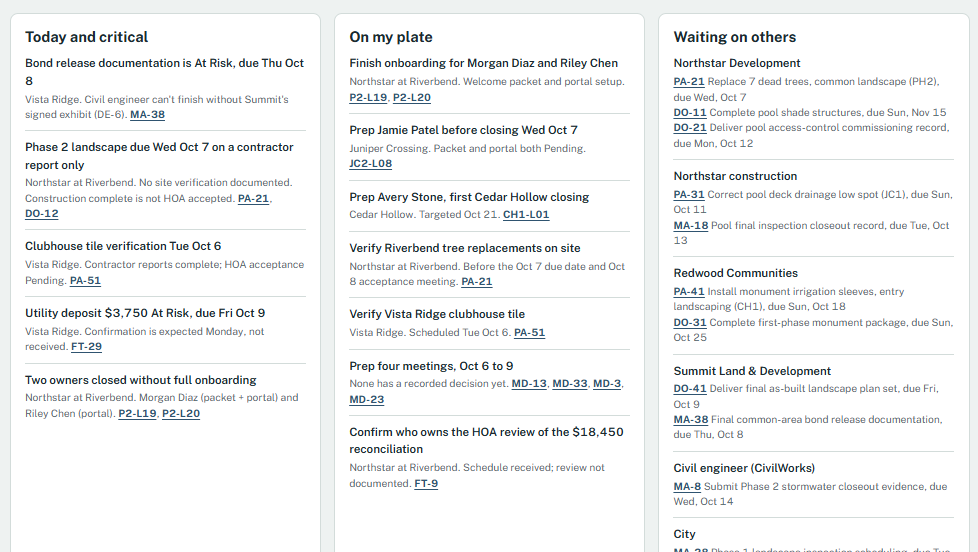
Command Center
The attention layer—showing critical work, development pulse, turnover readiness, Waiting on Others, decisions and risks, milestones and the next actions that need attention.
Core System
The durable operational truth—organizing supported facts, workflow state, ownership, evidence, obligations, risks and transition impact.
Toolkit
The action layer—helpers that prepare and advance work through the Core without creating duplicate shadow trackers.
One purchase → one complete install file → one paste → Ginny is installed. Included tools and companions share that installation; they do not require separate installs. Manual and Connected are operating modes of the same system. Relevant history and unresolved developer-era work can carry into standard Ginny HOA operations at turnover.
Pricing is scoped — contact us to discuss your Developer-Controlled communities.
Ginny works alongside your existing systems and professionals. It isn’t a property-management platform, accounting or construction-management software, legal counsel, engineering or a reserve study.
The full lifecycle — not just turnover
- Developer control
- Development & buildout
- Owner closings & onboarding
- Common-area construction
- Completion & inspection
- Punch list & acceptance
- Developer obligations
- Financial stabilization
- Contract & vendor transition
- Turnover preparation
- Governance transition
- Post-turnover stabilization
- Owner-controlled operations
Some work—like getting management operational—runs in parallel rather than as a single stage.
Who it’s for
Teams responsible for operating and transitioning developer-controlled HOA/community environments, including community/association management teams, developers/declarants and their operational teams, and transition stakeholders.
Questions Ginny helps you answer
See the work that has to happen before “complete” actually means complete.
- What is still being built?
- What is actually complete?
- What still needs inspection or acceptance?
- What does the developer still owe?
- Are buildout costs tracking against the work?
- Are we operationally ready to manage the community?
- Are critical documents actually ready to use?
- What changes financially when developer support ends?
- What still has to happen before turnover?
- What needs my attention next?
Built into the system
Get management operational without losing the development picture.
Core workflow
Community Launch & Management Onboarding
Are we actually ready to manage this community?
From management kickoff through go-live and first-cycle QA: records and data collection, banking and accounting setup, the developing-community operating budget, assessment and billing setup, owner and unit data, portal access, vendors, governance and policies, communications and the compliance calendar.
Ginny keeps first billing verification, the first financial-cycle review, launch QA and unresolved launch items visible until launch is formally closed out—because go-live isn’t the same as launch complete.
Works alongside your existing management software, using information you supply or supported sources you authorize, for brand-new onboarding or communities you take over midstream.
Companion capability
Document & Policy Readiness
Having the document is not the same thing as being ready to use it.
Ginny follows governing documents, amendments, rules, plats and site plans, design standards, budgets, reserve studies, insurance, contracts, rosters, fee schedules and collection or enforcement policies from requested and received through reviewed, approved, executed and configured—until they are operationally ready.
Readiness connects back to the operational work it affects. It isn’t a separate document library.
Optional Core capability
Development & Buildout Budget
Are buildout costs tracking against the work?
For teams that manage or have visibility into developer construction finances. Ginny connects financial progress with physical progress: approved budgets by phase and improvement, contracts and commitments, approved and pending change orders, paid-to-date, cost to complete, forecast at completion, contingency, variance and how fresh the reconciliation is.
“Phase 2 landscaping is 85% physically complete while 97% of the budget is committed.”
Optional, because not every manager controls developer finances. Ginny is not construction accounting software and doesn’t replace the developer’s accounting system, GL/AP, ERP, construction-management platform, CPA or cost engineer. The developer’s buildout budget is also kept separate from the HOA operating budget.
Accepted means accepted
Reported complete, accepted, paid and owed—kept honestly apart.
Construction complete isn’t accepted for HOA responsibility. A pending change isn’t an approved change order. What the developer pays today isn’t automatically a permanent HOA cost. And a Board election doesn’t mean authority has transferred.
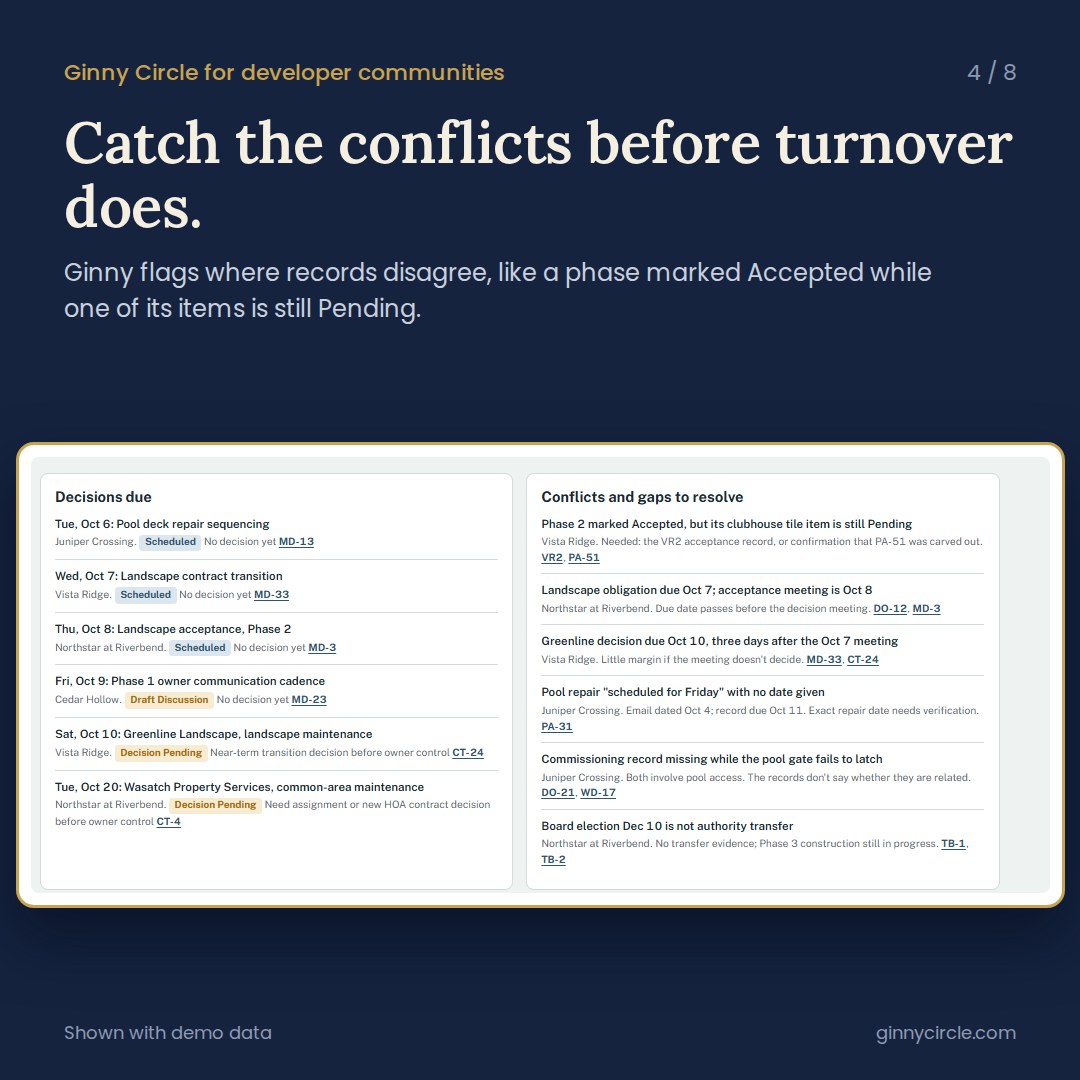
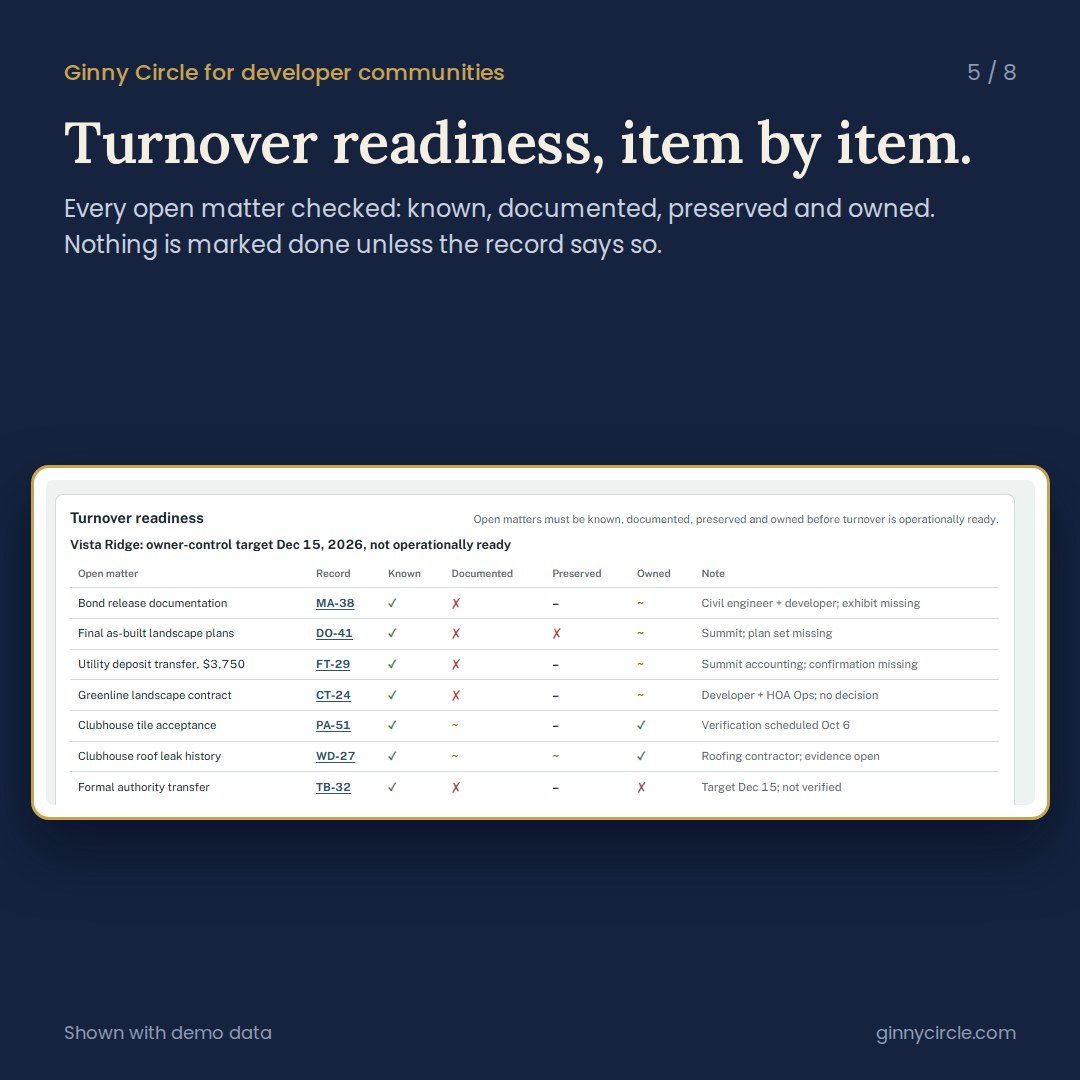
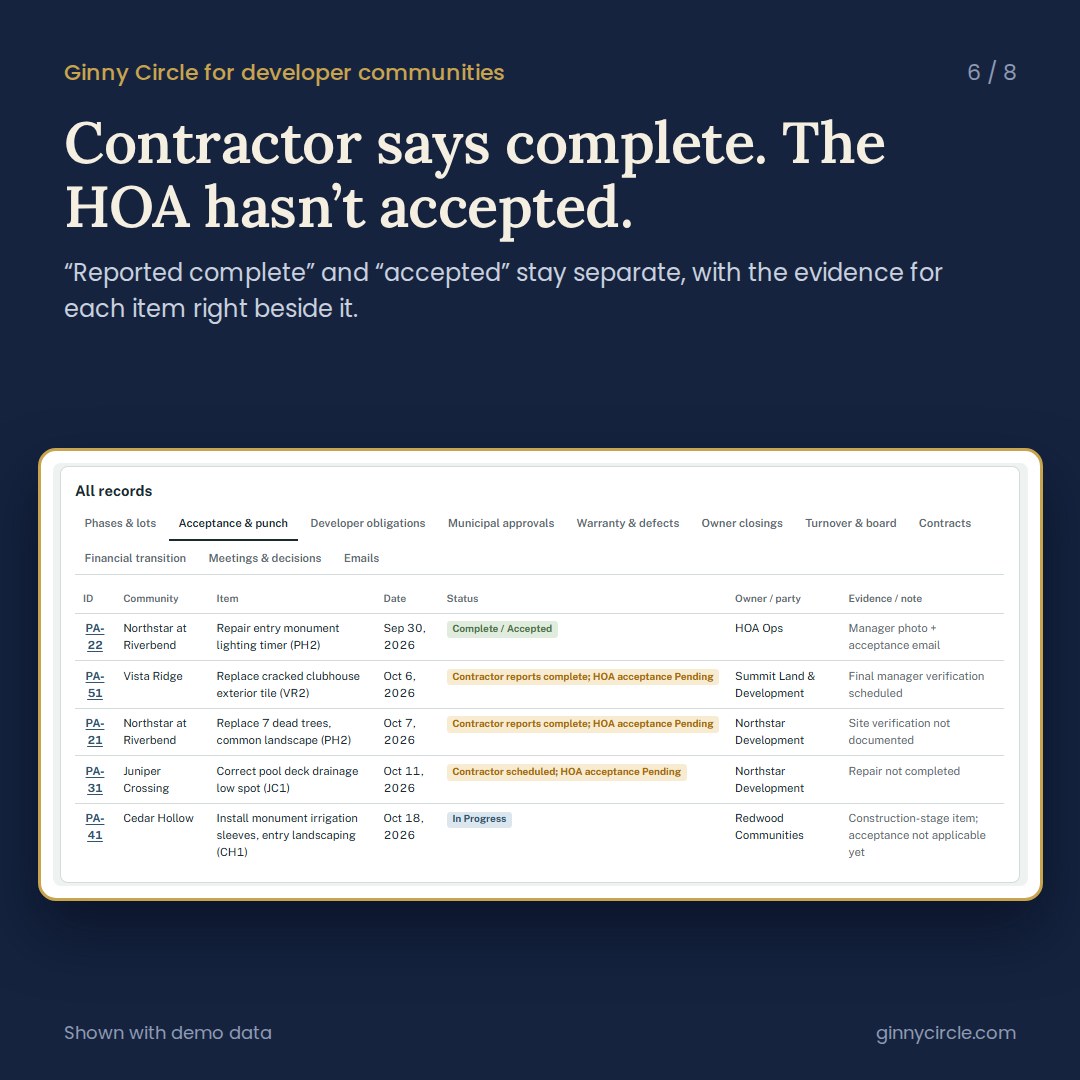
Shown with demo data.
The result
One coherent operating environment.
Know what is true, what is changing, what needs attention, who owns the next action, what needs verification and what must survive turnover.
Manual or Connected
Same Ginny. Different ways of bringing the work in.
Manual works with Project Sources, messages, uploads, spreadsheets, exports and copy/paste. Connected can additionally use supported and authorized connected sources available in your compatible AI environment.
Connected builds on your Project Sources. Same product, same price, same intelligence. Operating modes, not intelligence tiers; no universal integrations or continuous monitoring.
Getting started
After installation, add your Project Sources.
After installing Ginny, add the best current sources that show what you manage and the work already in motion. These Project Sources give Ginny a reliable operational baseline. Begin with current rosters, exports or worklists, then add procedures, authority documents and contracts.
Project Source setup is onboarding, not another installation. A dedicated compatible AI Project/workspace can be named “Ginny Circle — [Property / Portfolio / Company Name]”. The Command Center is part of your installed product, not a required Project name.
Not sure which Ginny fits?
Answer one quick question and we’ll point you to the right Ginny — or talk with us directly.