
Property Management · Self Managed
Your rentals. Your own operating system.
For individual rental owners and self-managers. One standalone Ginny for tenants, leases, vacancies, turns, maintenance and follow-up — without corporate management levels.
Standalone · one-time
Ginny Circle Self Managed
$179 one-time
For rental property owners. Not an HOA product. MEETGINNY 20% off applies.
What it runs
A rental-portfolio operating system for private owners and self-managers who need clear visibility into tenants, leases, vacancies, turns, maintenance, follow-up and what needs attention next—without being forced into corporate management terminology.
- Tenants & leases
- Vacancies
- Turns
- Maintenance
- Follow-up
- What needs attention next
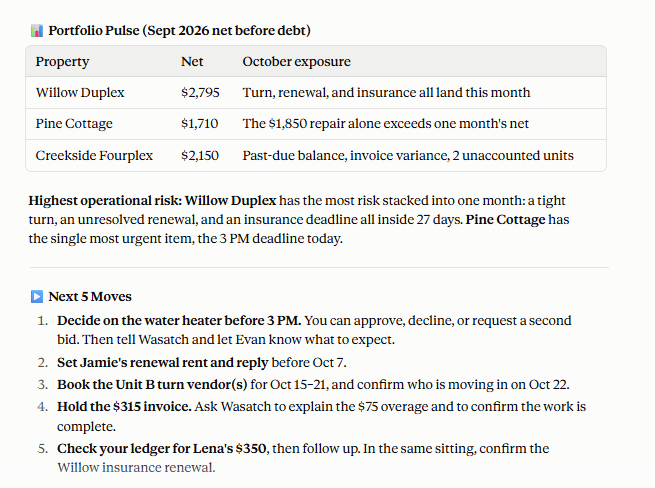
Email & inbox operations
Your inbox is full of operational work. Ginny helps turn it into action.
See what needs attention before you open email. Then let Ginny find the messages that matter — new operational email, replies, approvals, escalations and commitments tied to active work. Read less. Miss less. Follow through.
- 1
Review
Review the dashboard.
- 2
Scan
Scan the connected inbox.
- 3
Reply
Draft and send the replies that need attention.
- 4
Follow through
Carry commitments and follow-up back into the work.
Keep tenant requests, vendor replies, payments-related questions and promises from falling through the cracks — without a second task system.
Email shouldn’t be a second task system. Inbox scanning and sending work through a supported, authorized email connection, when you ask — Ginny does not continuously monitor inboxes or send on its own. Replies are sent from your work email with your direction and approval, where the connection supports sending. Your email platform remains the official record, and an email saying something happened is treated as context: it never silently changes a status such as Requested to Approved or Scheduled to Completed. Manual mode stays fully useful without a connection. How email works with Ginny
One purchase → one install file → one paste → Ginny is installed. Ginny works alongside your PMS and accounting — it never replaces your system of record. Choose Manual or Connected; both are the same product and price.
Not sure which Ginny fits?
Answer one quick question and we’ll point you to the right Ginny — or talk with us directly.